Construction skills for the next generation
The OTAC team has designed and delivered programmes that give school-age students real interest, understanding and experience of construction skills — not a careers talk, but hands-on instruction from people who have spent their working lives in the trade.
On-site, hands-on — available now
Mark's team has run these programmes in schools and colleges already, and can run them again at short notice. Programmes are built around what a school actually needs — the year group, the time available, the facilities on hand — and delivered by qualified instructors with decades of site and further-education experience behind them.
Remote delivery, built the same way
The same instructors, the same material, delivered through our training platform — with a schools version that holds no pupil data at all.
We can have this running for a school that wants it. Tell us your timescale and we'll work to it.
The site simulator — part of both
Some things are better learned by getting them wrong a few times, and you cannot get a wall wrong a few times on a real site.
Students build to a specification, then watch what happens when the storm comes. Built right, the wall holds at 60 mph. Starve the mix of water and the same wall fails at 44 — and the debrief explains exactly why. Then they go and do it properly, with their hands.
It runs in a browser on the school's own machines, and it is part of the programme whether we deliver it on-site or remotely.
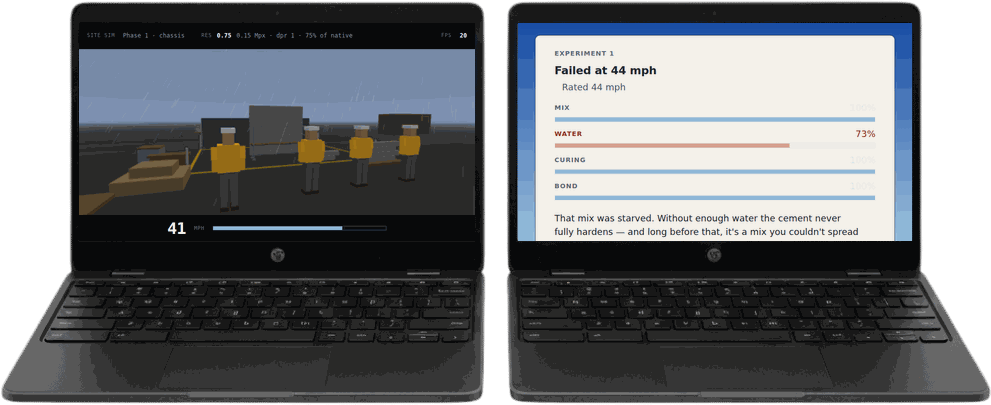
Opens in a new window. Works best on a desktop or tablet — it'll run on a phone if you turn it sideways.
You'll see a box for a code: that's how a student would start, using a token from their teacher. To try it yourself, click Resume underneath.
No pupil data. By design.
Students are identified by a six-character token from a card on their desk. The list matching tokens to names stays with the teacher and never enters the software.
There are no pupil accounts, no email addresses, no names, and nothing stored on our servers at all — the work a student does stays in the browser until their teacher downloads it. The same approach carries into the schools version of the training platform.
Tailored to your school
Every programme is shaped to the school it's delivered in. Tell us what you're trying to achieve and we'll tell you what's possible.
Thanks — we'll be in touch very soon
We read every one of these ourselves.